
FOV Scaling: Why Ultrawide Isn’t “More View”
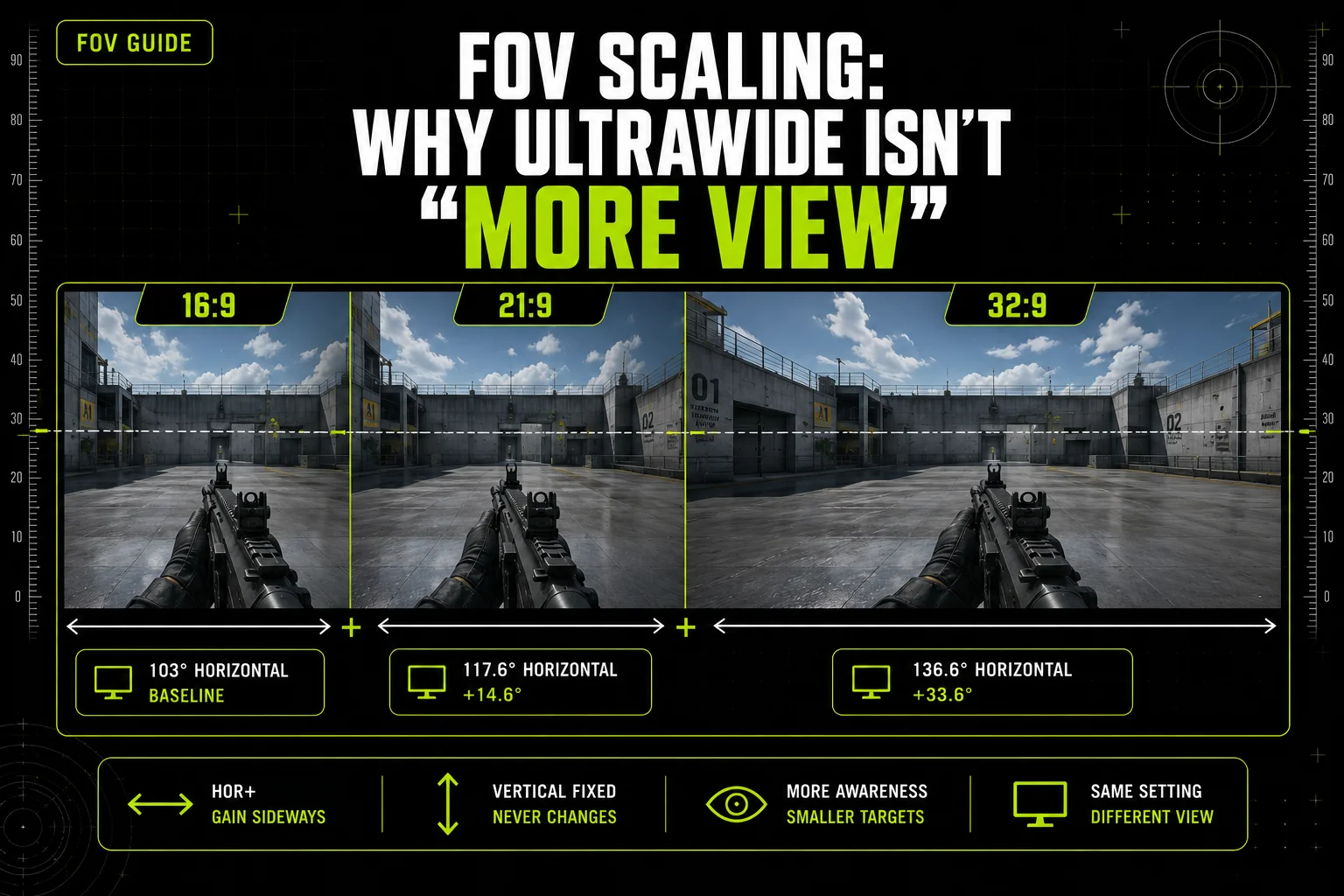
Buy an ultrawide monitor and the assumption follows automatically: more screen means more view. Sometimes that’s exactly right. Sometimes the game crops your vertical view instead and hands you nothing extra at all — same wider monitor, opposite result. Which one happens depends entirely on a scaling behavior most players have never heard named, and it isn’t something you can guess from the screen size alone.
This guide explains the two behaviors, shows what an ultrawide upgrade actually buys you in real games, and gives you a 30-second way to check which one your own setup is doing. For how games measure FOV in the first place, see our guide on which games use vertical FOV — the axis a game measures matters here too, since it’s the axis that determines what “stays fixed” when your aspect ratio changes.
8 mins read
Quick Answer
Whether ultrawide gives you a wider view depends on how the game scales. Most modern shooters use Hor+ scaling: vertical FOV stays fixed, and extra width adds horizontal view for free. Older engines and console ports sometimes use Vert−, which crops your vertical view instead. Check which one your game does before assuming a wider monitor means more awareness.
Hor+ vs Vert−
Hor+ (horizontal plus) is the behavior your ultrawide monitor was built to reward. The game holds vertical FOV constant no matter what aspect ratio you’re running, and lets the horizontal figure expand to fill the wider screen. Every game confirmed on this site uses Hor+ — it’s the standard approach in modern engines, and it’s the reason ultrawide built a competitive following in the first place: you get real extra view, not just a wider window onto the same scene.
Vert− (vertical minus) works the opposite direction. Horizontal FOV is held constant, and going wider crops the top and bottom of the frame instead of extending the sides. It shows up in older engines and some console ports built around a fixed horizontal reference — on a Vert− game, a wider monitor doesn’t add view, it takes some away. See our horizontal vs. vertical FOV explainer for the underlying axis math both behaviors are built on.
Vert− tends to persist in games ported from a fixed console resolution, where the original build targeted one specific horizontal reference and ultrawide support was added later without rebuilding the camera system around it. It’s cheaper to crop the vertical axis than to re-tune every sightline, hitbox, and animation for a variable field of view — which is a plausible engineering reason for the behavior, even if it isn’t one any particular studio has spelled out for a specific title.
Did You Know? In a Hor+ game, vertical FOV is what stays fixed — so an ultrawide player and a 16:9 player at the same setting see identical vertical coverage. The ultrawide player only gains sideways. Valorant makes this concrete: because its FOV is locked on the vertical axis at 70.53°, a player on 21:9 automatically sees that same 70.53° of vertical view as a player on 16:9, with the horizontal figure simply expanding to 117.57° to fill the wider screen. Nothing to configure — the fixed axis makes it automatic.
That’s why “more view” is only half-right. You gain real horizontal awareness on a Hor+ game, but the vertical slice of the world you can see — how far you can look up a stairwell, how much of a tall building fits on screen — doesn’t change at all. It’s an expansion in one direction only, not a bigger window in every direction at once.
What You Actually Gain
The table below shows exactly how much horizontal view three real settings gain moving from 16:9 to 21:9 to 32:9, using Rainbow Six Siege‘s vertical-locked 90 setting, Call of Duty‘s horizontal 103 slider, and Valorant’s fixed value — all confirmed Hor+ implementations. This table exists to show the shape of the gain, not to replace each game’s own conversion table; for every other setting each game supports, see that game’s dedicated FOV page.
Figures assume the common 21:9 and 32:9 aspect-ratio classes. Exact panel resolutions vary slightly (a 3440×1440 panel isn’t quite the same ratio as a 2560×1080 one), which shifts the horizontal figure by a fraction of a degree either way.
What It Costs You
The extra horizontal view in a Hor+ game isn’t free, even though the FOV math makes it look that way. Four costs come with it, and they compound the wider you go.
Pixel density spreads thinner. At a fixed resolution, a 32:9 panel divides the same number of horizontal pixels across a much wider field of view than a 16:9 panel does. Distant details render with fewer pixels per degree, which can make far-away targets and text slightly softer before you account for anything else.
Targets shrink. This is the direct consequence of Hor+ doing its job: the same enemy at the same distance now occupies less of your screen relative to the wider frame, because the frame shows more world without the target itself getting any bigger. More awareness, smaller target — that’s a genuine trade, not a flaw in the math.
Edge distortion gets worse. Most engines use a rectilinear projection, which keeps straight lines straight but stretches objects increasingly as they approach the edge of the frame. A 32:9 setup pushes more of the visible world toward those distorted edges than a 16:9 setup does at the same underlying vertical FOV.
GPU load increases. Rendering a wider field of view at the same resolution means more of the game world — more geometry, more effects, more visible players — falls inside the camera frustum every frame. On a 32:9 panel that’s stacked on top of the higher native resolution most ultrawide monitors already run at, so the performance cost compounds from two directions at once.
Common Mistake: Raising your in-game FOV slider on top of an already-wide ultrawide aspect ratio. The aspect ratio is already widening your view automatically in a Hor+ game — stack a maxed-out FOV setting on top of that, and you’re compounding two separate wideners at once. The result is often more edge distortion and smaller targets than either change produces on its own, without a proportional gain in useful awareness. If you’ve just switched to ultrawide, try your old FOV setting unchanged first, rather than assuming higher is automatically better now that you have more screen.
The 30-Second Test
You don’t need a wiki or a forum post to find out which behavior your game uses. You can check it yourself in under a minute.
Open the game’s video settings and switch your resolution or aspect ratio to an ultrawide profile — 21:9 or 32:9, whichever your display or window supports. Watch the top and bottom edges of the frame as the change applies.
If the top and bottom of what you can see stay in the same place — the horizon doesn’t shift, nothing that was visible above or below disappears — the game is Hor+. You’ve gained view purely on the sides, and your vertical FOV hasn’t moved.
If the top and bottom of the frame visibly crop inward, losing whatever was previously at the extreme top or bottom of your view, the game is Vert−. You’ve traded vertical awareness for horizontal width, not gained anything for free.
This test works in any game with an adjustable resolution or aspect ratio, and it settles the question faster than searching for an official statement from the developer — most don’t publish one.
A screenshot comparison makes the result easier to trust than memory alone. Capture one screenshot at 16:9 and a second at your ultrawide resolution from the exact same in-game position, then line up the top edge of both images. If the horizon and ceiling height match pixel-for-pixel between the two, you’re looking at Hor+. If the ultrawide screenshot shows less sky or floor than the 16:9 one, that’s Vert− cropping in action.
The Sim Racing Exception
Sim racing breaks the Hor+ pattern in an important way. In most sim racing titles, FOV isn’t a preference — it’s calculated from your physical setup: seat distance, screen size, and screen curvature feed into a formula that produces the one value that makes the scene feel correctly scaled, so objects on screen appear the size they would through your actual windshield. Switch to a wider aspect ratio in a sim and the correct FOV genuinely changes, because the geometry it’s solving for changed. That’s not a free width bonus the way it is in a shooter — it’s a different target number entirely. See our sim racing FOV guide for how to calculate the correct value for your own setup; the geometry behind why sim racing works this way is a topic detailed enough to deserve its own separate explanation.
– FAQ
Common questions about ultrawide FOV scaling.
It gives more peripheral awareness in Hor+ games, since you gain horizontal view without losing anything vertically. Whether that becomes a real edge depends on your setup and how well you track proportionally smaller targets — it’s a preference and skill trade-off, not a guaranteed advantage. Some tournament rulesets have restricted specific aspect ratios in the past, so check current regulations for any event you’re entering.
Not automatically. In a Hor+ game your vertical FOV hasn’t changed at all just from switching aspect ratios, so there’s no default reason to lower a setting that already worked for you. Consider adjusting only if the added horizontal width feels distracting, or if you’re stacking it with an unusually high FOV slider on top.
That depends on the game and, for organized events, the ruleset. 32:9 produces the widest horizontal view and the most edge distortion of the common ultrawide formats — some players find that genuinely useful, others find it distracting. Specific tournaments have restricted specific aspect ratios before, so check the current rules for whatever event you’re entering rather than assuming it’s allowed or banned everywhere.
No. Support ranges from full native Hor+ scaling to cropped or stretched implementations, and some titles cut off UI elements or cinematics at very wide aspect ratios even when core gameplay scales correctly. Check a specific game’s settings menu or community reports before assuming full support.
It can, for two compounding reasons: ultrawide monitors typically run a higher native resolution than 16:9 panels, and rendering a wider FOV means more of the game world falls inside the camera frustum each frame. Both add GPU load independently of each other, so the combined hit is often bigger than either alone.
Your vertical FOV likely hasn’t changed in a Hor+ game, but your peripheral vision now picks up new information at the screen’s edges, and a resolution change alongside the aspect-ratio switch can shift how far a given mouse movement travels on screen. Give it a session or two before assuming something is configured wrong.
– RELATED TOOLS
– RELATED GUIDES