
Warzone FOV: Stop Guessing Between 90 and 120
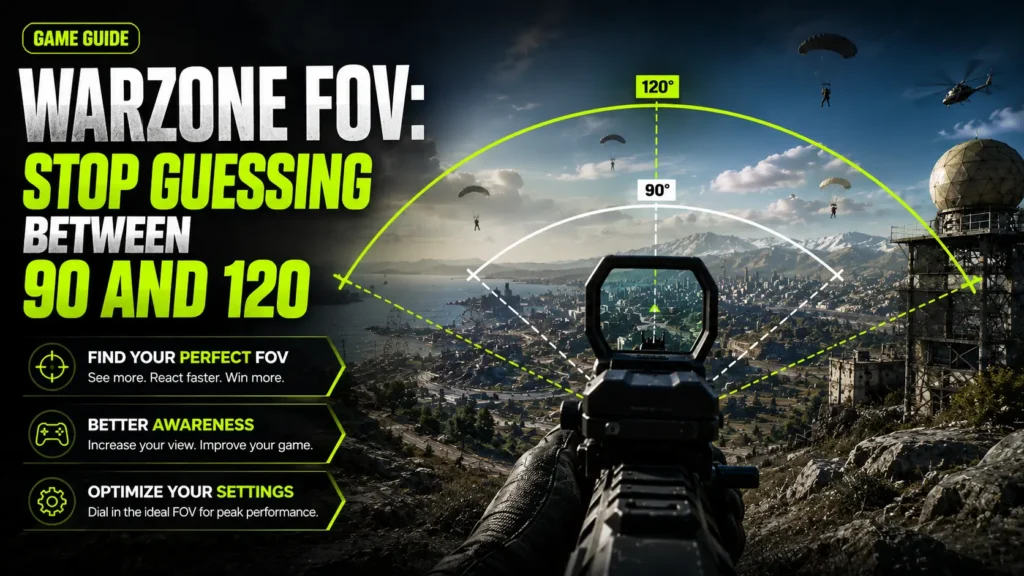
FOV shapes almost everything about how Warzone feels — how early you spot a rotation across an open field, how big an enemy looks in a long-range duel, how natural your movement feels while sliding into cover. It’s one of the first settings serious players tune, and one of the most argued about, because the “right” number depends heavily on your platform, hardware, and playstyle.
This guide covers Warzone’s FOV slider in the current Black Ops 7 era, the Affected vs Independent ADS FOV setting, how FOV interacts with recoil and movement, and realistic recommendations for different player types — without pretending one number is universally best. For general FOV fundamentals, see our horizontal vs vertical FOV guide.
13 mins read
Quick Answer
Many competitive PC players settle around 100-110 FOV for a strong balance of awareness and target size. Higher values like 120 maximize peripheral vision but shrink enemies further. Lower values like 90 improve long-range visibility at the cost of side vision. The best choice depends on your platform, hardware, and personal preference — there’s no single correct number.
What Is FOV in Warzone?
FOV — field of view — is the angle of the game world your camera renders on screen at once. A narrow FOV feels like a tighter, more zoomed-in window: enemies look larger, but you see less of what’s happening around you. A wide FOV pulls the camera back: you see more of the map, but individual targets shrink.
Warzone measures FOV horizontally, which is standard for the Call of Duty engine family. A wider horizontal FOV shows more of the map to your left and right — useful on Warzone’s large, open battle royale maps where enemies can approach from wide angles that a narrower FOV would keep hidden until they’re much closer.
Did You Know? Warzone runs on the same Call of Duty engine lineage that’s carried FOV sliders since Modern Warfare 2019 — this is why the 60-120 range and the Affected/Independent ADS system have stayed largely consistent across Warzone’s Verdansk, Warzone 2.0, and current Black Ops 7-integrated eras.
Warzone FOV Slider Explained
Warzone’s FOV slider is available to every player on every platform — PC, PlayStation, and Xbox all get the same control, which isn’t true of every shooter in this genre.
Alongside the base FOV slider, Warzone also includes a separate Weapon Field of View setting (sometimes called Wide Weapon FOV), which shrinks how much of the screen your weapon model occupies without changing your camera’s actual FOV — useful for players who want a cleaner view of the crosshair area without touching their core FOV value.
90 vs 100 vs 110 vs 120 FOV
The gap between 110 and 120 is smaller in practice than the gap between 90 and 100 — most of the awareness gain happens in the middle of the range, while the top end mostly trades away target size for diminishing peripheral returns.
Best Warzone FOV Settings
Competitive Players
Most competitive-minded PC players land around 105-115, prioritizing awareness on Warzone’s large maps without pushing all the way to 120, where long-range target size starts to suffer.
Casual Players
Somewhere in the 90-100 range is a comfortable, low-effort starting point that doesn’t require much muscle-memory adjustment from the default.
Snipers
Lower FOV values (90 or below) keep long-range targets larger and easier to track through optics, since sniping rewards precision over peripheral awareness.
Aggressive SMG Players
Higher FOV values (110-120) suit close-range, movement-heavy playstyles well, since targets stay large enough up close regardless of FOV and the extra awareness helps with flanks in fast fights.
Controller Players
A moderate range (95-110) tends to work well, since very high FOV shrinks targets to a point where aim assist has less to lock onto.
Mouse & Keyboard Players
Since precise micro-adjustments are easier with a mouse, M&K players can push toward the 110-120 range more comfortably than controller players, without losing as much practical accuracy.
Low-End PCs
Keeping FOV closer to 90-100 reduces rendering load slightly, which can help maintain frame rate on weaker hardware alongside other performance settings.
High-End PCs
Hardware isn’t the limiting factor here — the ceiling is really about what target size and tracking feel you’re comfortable with, so high-end systems can run 110-120 without meaningful performance concern.
Pro Tip: Test any new FOV value in a private match or Resurgence lobby before taking it into Ranked or a Warzone tournament setting — target size changes affect your crosshair placement, and that takes a session or two to feel natural.
Affected vs Independent ADS Field of View
Beyond your base FOV, Warzone gives you a second setting: how your camera behaves when you aim down sights with low-magnification optics and iron sights (this setting doesn’t affect medium or high-zoom scopes, which use their own fixed magnification).
Since ADS FOV only affects low-zoom optics and iron sights, there’s no benefit for dedicated snipers choosing Independent in hopes of a tighter scoped view — magnified optics already use their own fixed zoom level regardless of this setting. Many players default to Affected for consistency, while others deliberately choose Independent to combine a wide hipfire FOV with a tighter aiming view. Neither is universally “correct” — it comes down to whether you value visual consistency or the compromise of two different fields of view for two different moments.
How FOV Affects Gameplay
- Recoil perception — wider FOV tends to make weapon recoil feel visually flatter, since the same muzzle climb covers less of a wider frame.
- Target size — the core trade-off: wider FOV means smaller, harder-to-hit targets, especially at range.
- Peripheral awareness — the main benefit of wider FOV, letting you spot rotations, vehicles, and flanks sooner.
- Tracking — moderate FOV values tend to support the most consistent tracking; extreme highs or lows ask more of your aim adjustment.
- Movement speed perception — wider FOV can make sprinting and vehicle travel feel faster, since more environment scrolls past at once.
- Slide cancelling — a wider FOV can make it easier to track your surroundings mid-slide-cancel chain without losing spatial awareness.
- Close-range combat — target size matters less at close range regardless of FOV, so the awareness benefit of a wider setting often outweighs the target-size cost here.
- Long-range engagements — this is where narrower FOV earns its keep, since distant targets don’t shrink any further than necessary.
Does Higher FOV Reduce FPS?
Slightly, in most cases — but it’s rarely the biggest lever available to you compared to other graphics settings.
Performance Note: If you’re chasing frame rate on weaker hardware, other settings — render resolution, texture streaming quality, and shadow quality in particular — usually free up more headroom than lowering FOV alone.
Best Graphics Settings to Pair With Your FOV
- Texture Quality — can generally stay high without much performance cost if you have the VRAM, since it doesn’t affect FPS as heavily as shadows or effects.
- View Distance — worth keeping reasonably high on Warzone’s large maps, since a short view distance can hide distant threats regardless of your FOV.
- Anti-Aliasing — lighter AA settings sharpen edges, which some players find helps target acquisition at the wider FOV values where enemies are already smaller.
- DLSS / FSR — upscaling technology that can recover frame rate lost to a wider FOV or higher resolution without a major image-quality trade-off.
- NVIDIA Reflex — reduces system latency independent of FOV; worth enabling regardless of your FOV choice on supported hardware.
- Motion Blur — best left off. It smooths camera movement visually but reduces target clarity during fast turns, which compounds with a wide FOV’s smaller targets.
- Depth of Field — typically disabled competitively, since it blurs background detail that a wide FOV is specifically meant to reveal.
- Film Grain — adds visual noise that can obscure distant targets; most competitive players set this to zero.
- Shadow Quality — one of the heavier performance costs in the graphics menu; lowering it often frees up more FPS than adjusting FOV.
- Screen Space Reflections — mostly cosmetic; disabling has minimal gameplay impact and can help performance on weaker systems.
Controller vs Mouse & Keyboard FOV Recommendations
The two input methods interact with FOV differently, mostly because of how aim assist and precision aiming behave at different target sizes.
- Aim assist interaction — aim assist is generally tuned around a certain target size on screen; pushing FOV very high shrinks targets further, which can make aim assist feel less consistent for controller players.
- Tracking — mouse users can make finer manual corrections than a controller’s assisted tracking, giving M&K a bit more room to run wider FOV comfortably.
- Flick shots — precise flicks are generally easier at moderate FOV for both input methods, since extreme FOV values change how far a given real-world angle translates on screen.
- Sensitivity — any FOV change alters how enemies appear to move across your screen, even without touching your sensitivity value, so expect an adjustment period after a change.
- Close-range engagements — both input methods handle close-range fights well across most of the FOV range, since target size matters less up close.
- Competitive play — controller players competing at a high level generally favor the moderate end of the range (95-110) to keep aim assist working predictably, while M&K players have more flexibility toward the top of the range.
Common Warzone FOV Mistakes
- Using 120 FOV because streamers do — a streamer’s setup, sensitivity, and years of practice at that value don’t transfer just by copying the number.
- Constantly changing FOV — prevents your crosshair-placement muscle memory from ever settling into a consistent feel.
- Ignoring ADS settings — Affected vs Independent meaningfully changes how aiming feels; testing only your base FOV without considering this setting is an incomplete picture.
- Copying pros without matching sensitivity — FOV and sensitivity interact; adopting one without the other often feels worse than either alone.
- Choosing the highest value on low-end hardware — a few extra FPS lost to FOV can matter more than the awareness gained if it costs you frame consistency.
- Ignoring monitor size — the same FOV number feels very different on a small monitor at close range versus a large screen further back.
Common Mistake: Treating FOV as a single “set it once” number without revisiting it after a major hardware or monitor change — what felt right on your old setup may not translate directly to a new one.
Warzone FOV Compared to Other FPS Games
Warzone’s 60-120 range is one of the widest in mainstream competitive shooters, which is part of why FOV discussion is so active in its community compared to games like Valorant that remove the choice entirely.
Conclusion
There’s no single best FOV in Warzone — 90, 100, 110, and 120 each trade target size for awareness in a different place, and the right value depends on your platform, hardware, playstyle, and whether you’re chasing long-range precision or close-quarters reaction time. Add the Affected vs Independent ADS choice on top, and there’s real room to tune the setting to how you actually play rather than copying a number from someone else’s setup.
Test a few values within the 90-120 range, pick one you can track consistently under pressure, and give it time to become muscle memory before judging it — consistency matters more here than chasing the theoretically perfect number.
– FAQ
Common questions about Warzone FOV settings.
There isn’t one universal best value. Many competitive PC players land around 100-115 for a balance of awareness and target size, but the right choice depends on platform, hardware, and playstyle.
It maximizes awareness but shrinks targets more than any other value. It suits close-quarters, movement-heavy playstyles better than long-range precision play.
Not inherently. It gives up some peripheral awareness but keeps targets larger, which suits long-range and precision-focused play well.
It doesn’t change the underlying recoil pattern, but wider FOV makes recoil appear visually flatter and easier to compensate for on screen.
Not directly. It improves awareness but shrinks targets, which can make precise long-range tracking harder rather than easier.
Slightly, since more of the map renders each frame. The effect is usually small on modern hardware but more noticeable on older or budget GPUs.
Affected offers consistency between hipfire and aiming; Independent gives a wider hipfire view with a tighter aim view at the cost of a more jarring transition. Neither is objectively correct — it’s a personal preference.
Often, yes — controller players tend to favor a more moderate range (95-110) to keep aim assist consistent, while mouse and keyboard players have more flexibility toward the top of the range.
Yes, indirectly. A larger screen or closer viewing distance changes how a given FOV setting feels, even though the game’s rendered FOV doesn’t change.
Many competitive PC players sit in the 105-115 range, though individual preferences vary and shift over time — treat this as a starting point, not a fixed standard.
No. Maximum FOV maximizes awareness but shrinks targets significantly — only worth using if you can still track and hit targets comfortably at that setting.
Yes. PlayStation and Xbox both have full access to the same 60-120 FOV slider available on PC.
Generally, yes — a lower base FOV (90 or below) keeps hipfire and low-zoom targets larger, which benefits long-range precision play. Note that magnified scopes use their own fixed zoom regardless of this setting.
– RELATED TOOL