
Which Games Use Vertical FOV? The Complete List
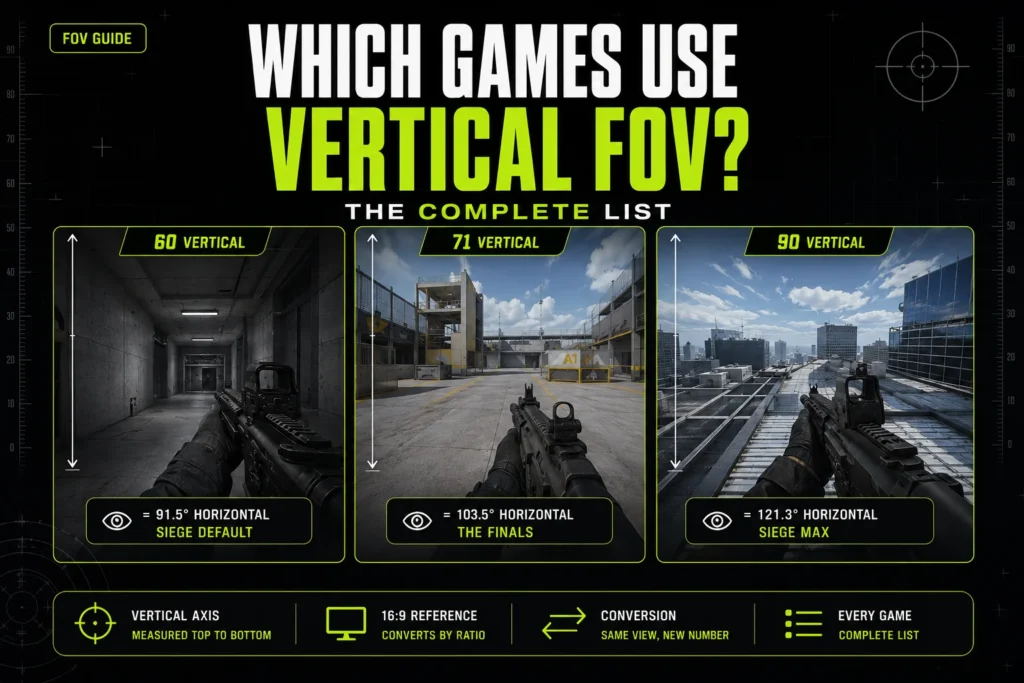
Set FOV to 90 in Apex Legends and you get a comfortably wide view. Set FOV to 90 in THE FINALS and the world warps — edges bending, movement smearing at the corners of the screen, like you’re playing through a fisheye lens. The number is identical. The axis it’s measured on isn’t: Apex measures FOV horizontally, THE FINALS measures it vertically, and 90° means something completely different on each one.
This guide lists every competitive shooter that measures FOV on the vertical axis instead of horizontal, what that means when you carry a number between games, and how much wider your view actually gets when you convert. For FOV fundamentals first, see our FOV in gaming guide or the horizontal vs vertical FOV explainer.
8 mins read
Quick Answer
Four competitive shooters measure FOV on the vertical axis: Valorant, Rainbow Six Siege, THE FINALS, and Escape from Tarkov. Call of Duty, Apex Legends, and Overwatch 2 all use horizontal FOV. Carrying a raw number from a horizontal-axis game into a vertical-axis game without converting it first changes your actual field of view by double digits.
The Complete List
These figures are confirmed against each game’s settings menu and, where available, developer documentation. Where a source disagreed with another, that’s flagged rather than picked whichever number read cleaner.
Not seeing a game you expected — like RaceRoom Racing Experience? It’s left off because independent sources currently disagree on which axis it uses, and this list only includes an entry once that’s confirmed.
Notice the adjustable ranges vary as much as the axes do. Tarkov’s 25-degree window (50–75) is the narrowest of any game here with a slider, while THE FINALS and Call of Duty each allow a roughly 60-degree swing — the widest on this list, despite measuring FOV on opposite axes. Sharing an axis with another game doesn’t mean sharing a comparable range, so it’s worth checking the table directly rather than assuming two vertical-axis games behave the same at their extremes.
Why the Axis Matters
FOV describes a cone of vision extending out from your character’s eyes. A vertical FOV measures that cone from top to bottom. A horizontal FOV measures it side to side. On any widescreen monitor, the horizontal slice of that cone is wider than the vertical slice, so converting a vertical number to its horizontal equivalent always produces a bigger figure — sometimes by 20 degrees or more.
The conversion itself is one formula, and it holds regardless of which game you’re converting from:
HFOV = 2 × arctan( tan(VFOV ÷ 2) × aspect ratio )
Worked Example: Rainbow Six Siege at its maximum of 90 vertical renders 121.3° horizontally on a 16:9 monitor — wider than Apex Legends allows at its own maximum of 110. A Siege player maxing out their slider is seeing more of the map than an Apex player at that game’s absolute ceiling. That single comparison is the most useful fact in this article: two “maxed out” settings are not remotely the same field of view.
This is why a number that feels normal in one game can look distorted in another. THE FINALS’ default of 71 vertical already renders as roughly 103.5° horizontal — close to Valorant’s fixed view — but push THE FINALS toward its 120 ceiling and you’re well past what any horizontal-axis shooter on this list permits at all.
Did You Know? A vertical FOV setting stays anchored to a fixed value regardless of aspect ratio — the horizontal figure simply widens or narrows around it as the monitor changes shape. A horizontal FOV setting works the other way: fix the horizontal value and the vertical view stays constant instead. Neither approach is wrong, but it’s part of why ultrawide and multi-monitor setups behave so differently from game to game.
The Valorant Special Case
Valorant doesn’t give players an FOV slider at all. Its field of view is locked at 70.53° vertical. That fixed vertical value happens to render as 103° horizontal on a 16:9 display — and 103 is the number almost everyone quotes when they talk about Valorant’s FOV.
That’s not wrong, exactly, but it’s incomplete in a way that causes real confusion. A number of sites and community posts describe Valorant’s FOV as simply “103,” full stop, without noting that 103 is the horizontal expression of a locked vertical value rather than the value the engine actually uses. It matters because 103 vertical and 103 horizontal are two very different fields of view — and if you’re trying to match Valorant’s feel in a game that lets you set FOV directly on the vertical axis, plugging in 103 will leave you far wider than Valorant actually renders. The number to match is 70.53, not 103.
How to Tell Which Axis a Game Uses
If a game isn’t on the list above, there’s a quick way to check for yourself. Open the settings menu and note the FOV number, then change your display’s aspect ratio — switch from 16:9 to an ultrawide profile, or resize the window if the game allows it. If the FOV number stays exactly the same while the view visibly gets wider, the game is using a fixed vertical value and letting the horizontal figure float. If the number itself changes when you switch aspect ratios, or the developer’s own patch notes say “measured at 16:9,” you’re looking at a horizontal-axis implementation.
Community wikis and settings guides get this wrong often enough that it’s worth checking developer statements directly when you can find them — Embark’s own confirmation of THE FINALS’ default is the kind of source that settles a disagreement, versus a forum post repeating what someone else already got wrong.
Steam’s own FOV field can be a shortcut too, when a game exposes it: some titles label the slider explicitly (“Vertical Field of View” or “Horizontal Field of View” right in the settings tooltip), which removes the guesswork entirely. When a game doesn’t label it, the aspect-ratio test above is the most reliable check you can do yourself in under a minute.
What to Do When Switching Games
The rule is simple: convert to a common axis before you carry a number anywhere. Never copy a raw FOV value from one game’s settings menu into another’s and assume it’ll feel the same — as the Siege-versus-Apex example above shows, “the same number” can mean a 30-degree difference in what’s actually on screen.
In practice that means picking one axis — horizontal is the more common reference point, since Call of Duty, Apex, and Overwatch 2 already use it natively — and converting every vertical-axis game’s number to match before comparing. Coming from Escape from Tarkov‘s default of 50 vertical, for instance, you’re actually sitting at roughly 79° horizontal, which lands closer to a mid-range Overwatch 2 setting than the raw “50” would suggest.
A practical way to handle it: write down your current game’s FOV and axis, convert it to horizontal, then convert that horizontal figure back to whatever axis your new game uses. That two-step trip is more reliable than trying to eyeball an equivalent, and it’s the same process whether you’re moving between two vertical-axis games with different defaults, like Siege and THE FINALS, or between a vertical-axis and a horizontal-axis game.
Whether a wider FOV actually helps you play better is a separate question from the conversion math, and it comes down to personal preference and monitor size more than any hard competitive rule — treat any specific number you land on as a starting point to tune, not a target to hit exactly.
Test the converted value in a private match or practice range before you take it into a ranked queue. The math gets you to the right number, but your muscle memory still needs a few minutes to catch up to it — crosshair placement, peek timing, and flick distance all shift slightly whenever the underlying FOV changes, even when the change is small.
– FAQ
Common questions about vertical FOV.
Vertical FOV measures your view cone from top to bottom; horizontal FOV measures it left to right. On a 16:9 monitor the horizontal measurement is always the larger number for the same actual view, because the screen is wider than it is tall.
Because “90” only means something once you know which axis it’s on. 90 horizontal in Apex Legends is moderate. 90 vertical in THE FINALS is close to that game’s maximum and converts to well over 120° horizontal — a much wider, more distorted view. Same number, different axis, different result.
103° is accurate as the horizontal expression of Valorant’s view, but the game’s actual fixed value is 70.53° vertical — there’s no slider, and 103 is a derived figure rather than a setting in Valorant’s menu. To match Valorant’s exact FOV in a game measured on the vertical axis, use 70.53, not 103.
Valorant, Rainbow Six Siege, THE FINALS, and Escape from Tarkov all measure FOV on the vertical axis. Call of Duty, Apex Legends, and Overwatch 2 measure it horizontally. See the full table above for exact ranges and defaults.
Use the formula HFOV = 2 × arctan(tan(VFOV ÷ 2) × aspect ratio), or plug your current game and target game into our FOV converter tool and skip the math. Always convert to a shared axis before comparing two settings — never copy the raw number across games.
A wider FOV shows more of your surroundings, which some players find helps with peripheral awareness — but it also shrinks distant targets and can introduce visual distortion at the edges of the screen. Whether that trade-off helps or hurts your performance is a matter of personal preference and playstyle, not a settled competitive edge.
– RELATED TOOLS
– RELATED GUIDES